Describe it. Ship it.
Say what you want and watch Theo build it in a live preview at a real URL — or start from one of 164 real templates. Add a database and user accounts when you need them, then publish with one click.
- Scaffolding index.html
- Styling the treatment menu
- Wiring booking and gift cards
- Preview synced
That's a real template from the library rendering its actual code — open it live to click around.
Start from a real site, not a blank file.
Code Canvas ships with 164 templates — every one built in the editor itself. The tiles below render each template's actual code. Open one live, click around, then make it yours by chatting.
164 templates · 8 categories · every tile is live code, not a screenshot
Browse them all in the editorAsk for a change. Watch it land.
Every request is a real edit to real files. Pick one and see what changes in the preview and in the code.
Restyled the hero section and added a primary button.
- styles.css+14-6
- index.html+4-1
One dial from fast to frontier.
Every build has a right speed. Stay on Fast for a flurry of small tweaks, drop to Max for a rewrite, reach for Ultra when a build fights back. Switch any time — it is one control in the editor.
Theo Code
DefaultThe everyday workhorse
Handles most of what you ask for — multi-file changes, auth scaffolding, new pages — with balanced speed and reasoning. Where most builds live.
- Most edits and new features
- Auth and data wiring
- Multi-file changes
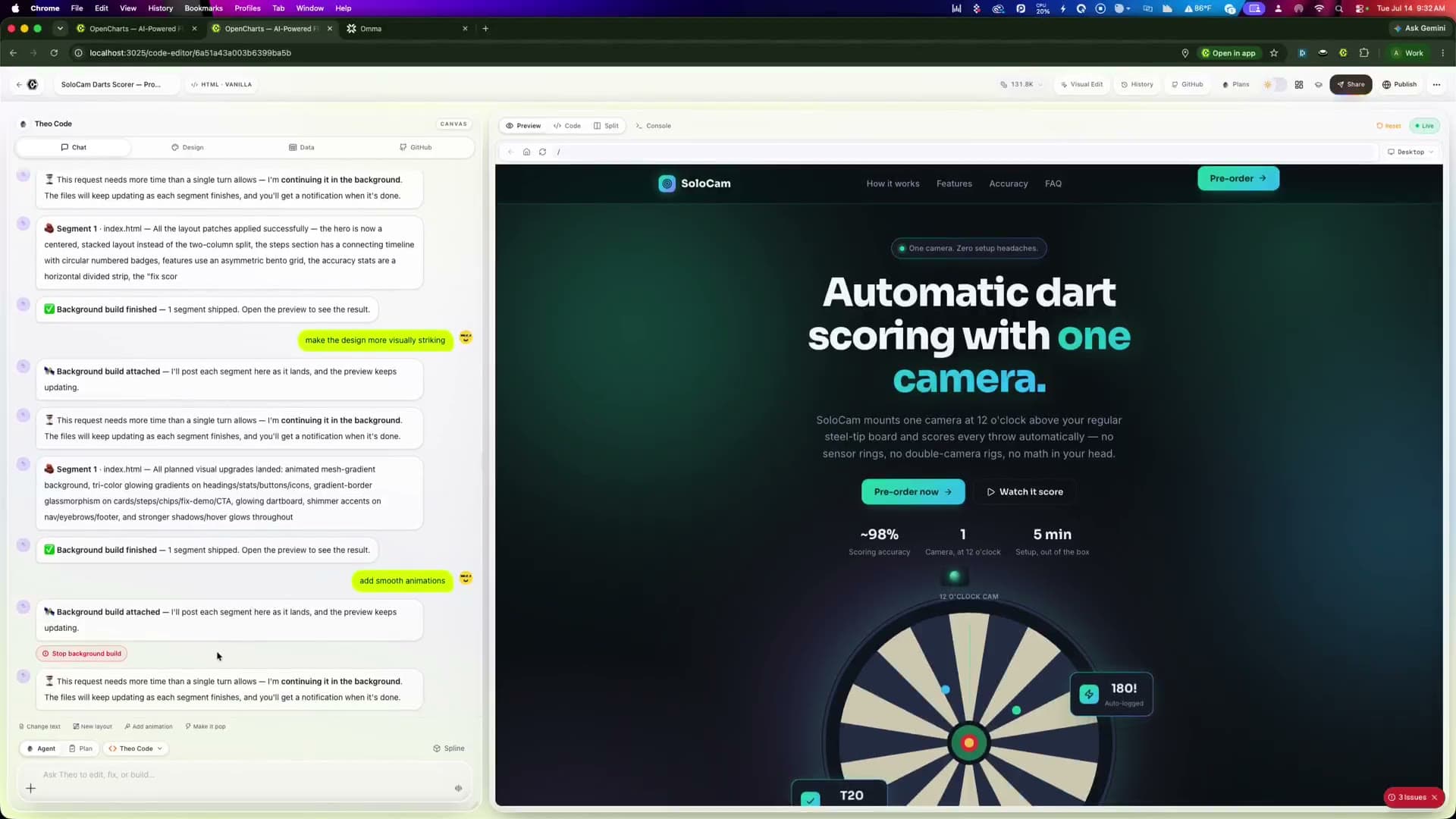
What you see is what publishes.
Every project serves at its own preview subdomain with real multi-page navigation, working forms, storage, and database queries.
Type a game. Play it.
Game Canvas is Code Canvas with a game engine attitude: two dedicated Theo Yoyi tiers, sprites and sound generated to order, and a build you can play the moment it lands. Don't take our word for it — press play.
- game.js — core loop + combo scoring
- sprites/ — 8 sprites drawn to order
- sfx/ — 3 hit sounds + a score loop
This is the real whack-a-mole template from the library, running its real code. Tap the moles, chase the combo.
Theo Yoyi
Fast engineRapid game iteration and live tweaks — nudge the difficulty, juice the hit effects, rebalance a level in seconds.
Theo Yoyi Max
Deep engineFull game builds and complex mechanics — physics, state machines, enemy AI, and multi-level progression.
Assets included
- Sprites drawn to order
- Sprite sheets cut to exact frames
- Sound effects + music loops
- Phaser and Three.js under the hood
More games you can play right now
all real templatesNode Blaster was built here too.
Our arcade shooter — sprites, sound, scoring, screen shake, the lot — was designed and developed in Game Canvas. It lives in the OpenCharts arcade, and it is exactly what your prompts can grow into.
From prompt to product.
Everything you need to go from an idea to a shipped app, without leaving the chat.
Build by chatting
Describe the outcome in plain English. Theo plans the build, writes the code, and iterates on your feedback.
Live preview at a real URL
Every project runs at its own preview subdomain with true multi-page navigation, not a sandboxed toy iframe.
Built-in database
Each project can provision its own Postgres database. Theo creates tables, seeds data, and wires your app to it.
User accounts and auth
Turn on authentication and your app gets sign-up, sign-in, and per-user data scoping with no backend work.
One-click publish
Ship the finished site to a public link instantly. Keep iterating, and updates republish in seconds.
Brand-aware builds
Drop in a brand guide, a logo, or your website URL and the build uses your real palette, fonts, and imagery.
Self-healing edits
Runtime errors are caught and fixed automatically, and every change is validated before it reaches your preview.
A template head start
164 real templates — landing pages, dashboards, stores, portfolios, and games. Open one live and make it yours by chatting.
Real code, yours
A full file tree, code editor, version history, and diffs. Inspect or hand-edit anything Theo writes.
Four steps to a shipped app.
Describe your app
“A booking site for my day spa” is enough. Start from scratch or from a template, and attach brand assets if you have them.
Theo builds a working first version
A complete, navigable site lands in the live preview with pages, styling, interactions, and data wired up.
Iterate in plain English
“Make the hero darker,” “add a contact form,” “store signups in the database.” Every change lands in seconds.
Publish and share
One click ships it to a public URL. Add a database and auth when you are ready to go from site to product.
Code CanvasThe whole loop, in one window
Chat, code, preview, database, and publish live side by side.
Everything before your first build.
Do I need to know how to code?
Can my app store data and have user accounts?
Is the preview real or a mockup?
How do I put my site live?
Can it match my brand?
Do I have to start from a blank page?
Which coding tier should I pick?
Can it really build games?

Your next app is one sentence away.
Start on the free plan, build in the live preview, and publish when it looks right.