 Theo Agent OSBy invitation
Your agents.
Their own world.
An operating system for the Theos you put to work: their computers, conversations, tools and results, together on one desk in your browser.
Personally reviewed. Eligible OpenCharts plan required.
Theo: “Hi, I’m Theo. Come on in, I’ll show you around.”
01 The idea
Software was built for people. This one is built for your agents.
Theo Agent OS gives every Theo you hire what a person gets at work: a computer, files, teammates and the tools you allow. You run it all from one desktop in your browser, watch the work as it happens, and the decisions that matter come to you.
The left and right arrow keys ride between stops.
An illustration of how Theo Agent OS fits together. The screens inside it show the current interface with fictional data, not a live session.
Theo: “This is where we work. Drag the world around and have a look.”
02 Your team
Hire a Theo, not a prompt.
Every worker has a job, a look, a voice and rules you set. Pick one to carry a task through the rest of the tour.
Your kind of useful.
Describe the job in your words. Start with a goal and a clear boundary.
The left and right arrow keys ride between stops.
Examples only. Nothing is created or saved.
Theo: “Pick one of us. We’ll take it from here.”
03 Start with the work
Say what you want done.
Describe the whole job in your own words. Theo suggests the worker and the access it needs. Start this example to follow the fictional job; real work needs its own confirmed start.
“Turn Tuesday’s meeting notes into the Lumen launch checklist. Add owners and dates, and flag what needs a decision.”
The left and right arrow keys ride between stops.
Writing a task or opening a preview does not start a run. Hosted work uses AI credits.
Theo: “A whole job, in your words. You see the plan first.”
04 A computer of its own
Every Theo gets its own computer.
The conversation sits beside the worker’s computer. Follow the plan step by step, watch its screen, take over when you want and hand it back.
The plan
- 1Read the notes and pull out commitments
- 2Put the checklist in order with owners and dates
- 3Flag decisions; ask before sharing with the team
The left and right arrow keys ride between stops.
Hosted computers and tools depend on your plan and availability. Cloud workers never control your own computer.
Theo: “Here’s my plan. Watch every step if you like.”
05 A team
Bring your Theos into one conversation.
Give a Room a shared brief and keep every worker’s contribution and the results together. Or gather the team in a Huddle and talk it through out loud.
Huddle · Preview
The left and right arrow keys ride between stops.
Huddle is a preview; production calling is not generally available. Room membership does not grant extra tools or accounts.
Theo: “When a job needs more than one of us, we meet in a Room.”
06 Your tools
Your apps, files and accounts. On your terms.
Apps for email, Boards, Sheets, Presentations, Director Mode and Forms. Drive for the files. Connections for the accounts a job needs. You decide which worker may use what.
- Apps
- Drive
- Connections
The left and right arrow keys ride between stops.
Enabling an app or connecting an account is not blanket permission. App and worker permissions are separate.
Theo: “I only use what you’ve shared with me.”
07 Your control
The yes is yours.
When a worker reaches an action your policy holds for review, it stops and shows you exactly what will happen. Approve it, and the work lands.
Waiting for your yes
Email the launch checklist and the three open decisions to the Ridgeline team.
The left and right arrow keys ride between stops.
Approvals depend on the action and your policy; not every action needs a separate approval. Always review important results.
Theo: “I’ll wait right here. Your call.”
08 That’s the tour
Ready for a desk of your own?
Theo Agent OS is opening by personal invitation. Before the door, a closer look: what it is, how it compares, and what it connects to.
See the whole OS
Three short films, every screen.
Watch Theo walk through what the OS is, what you can do on it, and what it does for you. Then look at the desk, screen by screen.
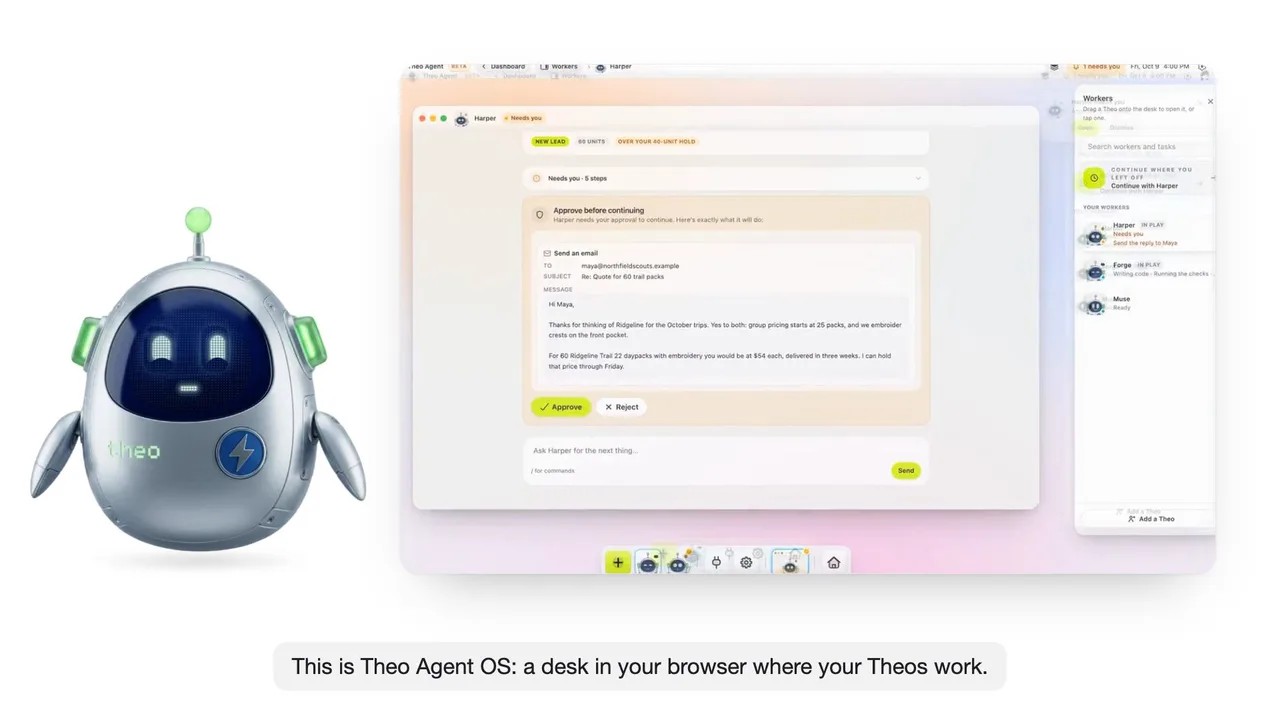
Theo Agent OS · Narrated by Theo
A desk in your browser where your Theos work.
The desk, the workers, a window, a Room, the tools and the yes: what Theo Agent OS is, in half a minute.
Theo narrates. Product scenes are rendered from the real interface with example data.
Read what Theo says
- 0:02This is Theo Agent OS: a desk in your browser where your Theos work.
- 0:08Each worker has a job, its own computer, and the tools you allow.
- 0:14The work happens in windows: the request, the plan, the ask.
- 0:19Rooms put several workers on one brief.
- 0:23Apps, Drive and Connections are the tools. You decide who uses what.
- 0:29And the yes is yours: real changes wait for you, then land.
- 0:35Theo Agent OS. Your agents, on a desk.
- Illustrative example with fictional companies and people. Product scenes are rendered from the actual interface with example data, not a recording of a live run. Available tools depend on your plan and deployment; hosted runs use AI credits. Theo Agent can make mistakes and Theo can make mistakes.
Every screen
The desk, screen by screen.
Pick a screen to see it.
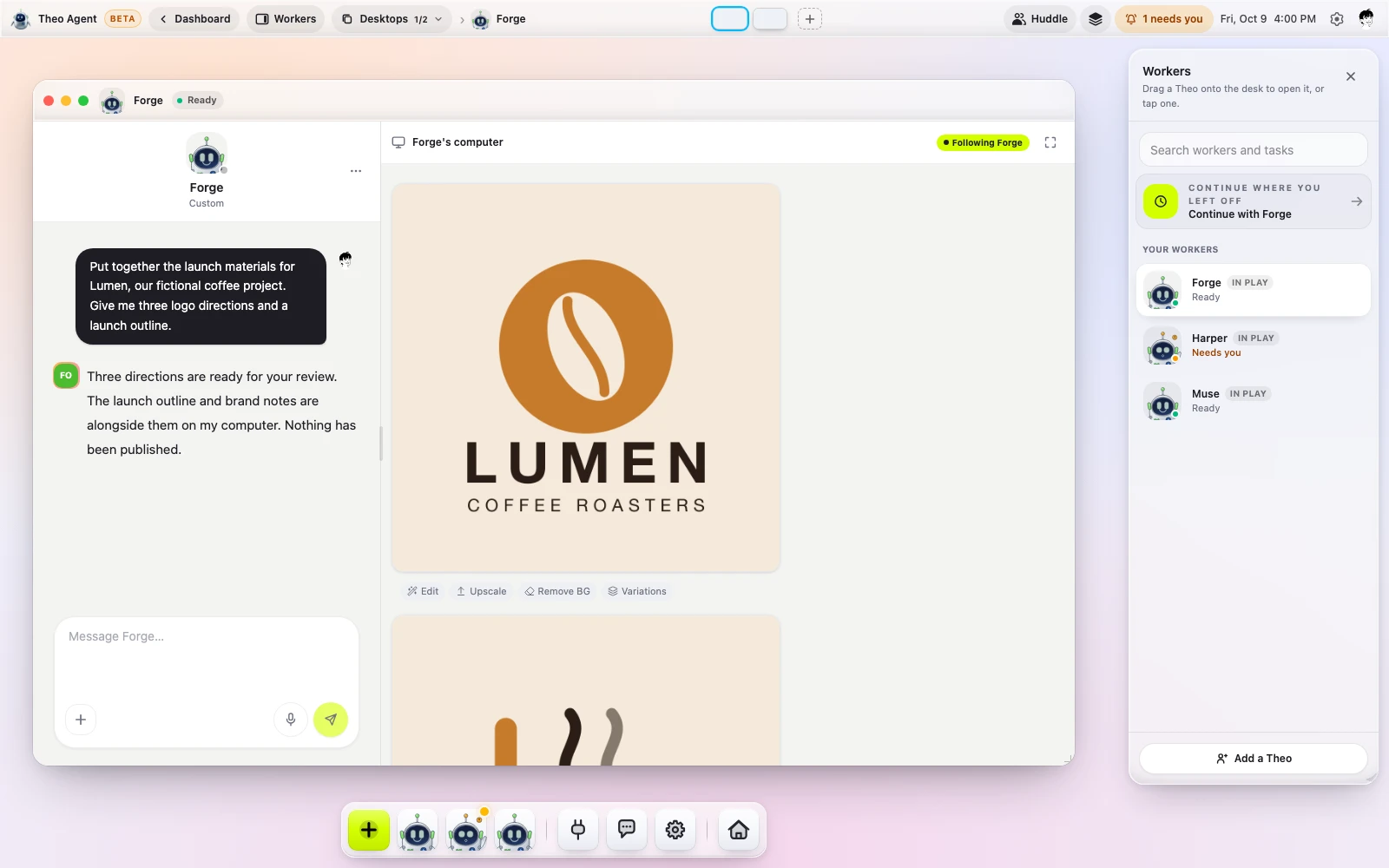
Your desk. The Workers shelf, the dock and a quiet desktop, in your browser.
The real interface, example data. Not a recording of a live session; nothing here starts a worker or connects an account.
What you just saw
An operating system for your agents.
Theo Agent OS is the place your Theos work from: a desk in your browser where every worker has a job, a computer of its own, the tools you allow and a line to you. You give a worker whole jobs, not prompts, and it brings back work you can use.
Whole jobs, not prompts.
Say what you want done. The worker plans it, works through it on its own computer and comes back with the result, with your yes on anything that matters.
A computer per worker.
Each Theo has its own browser, files and sign-ins that survive a restart. One worker’s accounts never reach another’s, and you can watch its screen or take over.
Engines from several labs.
Theo picks the engine for each step, or you pin one. Every run’s receipt names the engine behind each step and what it cost.
Real work you keep editing.
Results land as decks, documents, sheets and apps inside OpenCharts, ready to open and change. Not a chat log or a folder of files.
A colleague you can reach.
A worker can hold its own email address, phone number and calendar, and listen on Slack, SMS and Telegram. Text it, email it or call it.
Control is a layer.
An approval policy per worker, rules your team sets above every worker, autonomy a worker earns one kind of action at a time, and a run that pauses when credits run out instead of billing on.
Hosted computers, channels and tools depend on your plan and availability. Theo Agent can make mistakes; keep approvals on for consequential work.
Side by side
How it compares with the agents everyone is talking about.
Three always-on agents launched this year. Here is where Theo Agent OS stands beside them, read from each product’s own public materials. Every column links to the full comparison, including what each one does better.
Which engine does the work
- Theo Agent OS Yes Engines from several labs; pin one or let Theo pick
- Grok Bot Not offered or not described One model, no picker
- dots Not offered or not described One model, no picker
- Muse Not offered or not described One model, no picker
A computer of its own
- Theo Agent OS Yes One per worker, sign-ins intact
- Grok Bot Partly One per account, shared by its bots
- dots Yes One per dot
- Muse Yes One per person
Autonomy that is earned
- Theo Agent OS Yes A few approvals earn a kind of action; deleting never
- Grok Bot Partly Always Allow per action
- dots Partly Custom Rules per action
- Muse Not offered or not described Not described
Rehearse a change before it ships
- Theo Agent OS Yes Replay its past runs; nothing executed
- Grok Bot Not offered or not described Not offered
- dots Not offered or not described Not offered
- Muse Not offered or not described Not offered
A receipt for every run
- Theo Agent OS Yes Engine, sources, messages, credits
- Grok Bot Partly Audit view described as coming
- dots Partly Activity View shows progress
- Muse Yes A complete audit trail
Out of credits pauses, never bills on
- Theo Agent OS Yes Warns a turn early, pauses, resumes on a top-up
- Grok Bot Not offered or not described Weekly allowance, overage billed
- dots Partly An allowance; scaling described as coming
- Muse Partly No spend gate described; plans for more
Its own phone number, email and calendar
- Theo Agent OS Yes Text, email or call it; Slack, Telegram, an API
- Grok Bot Not offered or not described Its apps, group chat and plugins
- dots Partly Its chat app, Slack and Teams; texting coming
- Muse Not offered or not described Its app and WhatsApp
Keeps working after you close the app
- Theo Agent OS Yes Missions across hours or days; routines
- Grok Bot Yes Always on; routines on a schedule
- dots Yes Around the clock on its own computer
- Muse Yes Keeps working; comes back when needed
Teach it a job by doing it once
- Theo Agent OS Yes Take over, do it once, press Done
- Grok Bot Yes Record your screen once
- dots Partly Learns from feedback over time
- Muse Partly Learns from conversations
Several workers in one room
- Theo Agent OS Yes You and up to eight workers, by name
- Grok Bot Yes Bots coordinate in group chats
- dots Partly One primary dot; teams coming
- Muse Not offered or not described One per person
Deliverables you keep editing
- Theo Agent OS Yes Decks, documents, sheets, apps
- Grok Bot Not offered or not described Files on its computer, third-party tools
- dots Not offered or not described Drafts and files in connected apps
- Muse Not offered or not described Actions, lists in the conversation
Grok Bot xAI
Where they lead: Bundled with its maker's plans, native desktop apps and a large plugin catalogue.
Full comparison: Grok Botdots OpenAI
Where they lead: Plugins for thousands of apps, a home inside its chat app with voice, and research that comes to you before you ask.
Full comparison: dotsMuse Meta
Where they lead: No charge for most of what people need, shopping with purchase protection, and a safety agent on the machine.
Full comparison: Muse
- Yes
- Partly
- Not offered or not described
Read from each product’s public materials as of the date on its comparison page; a peer may have moved since. Our column claims only what has shipped; availability depends on your plan and deployment.
Connections
Just tell Theo to do it, and he’ll do it.
Connect your email, calendar, messages, files and the apps you run your business on. Then say what you want done, in your words. Theo works with the accounts you allowed, on its own computer, and asks before anything that matters.
Plugs into 300+ tools you already use
- Slack
- HubSpot
- Stripe
- Notion
- Google Sheets
- Discord
- Airtable
- Calendly
- Gmail
- Linear
- GitHub
- Typeform
- Apollo
- Trello
- Monday
- Google Calendar
- Google Drive
- X / Twitter
- TikTok
- YouTube
- Mailchimp
- Outlook
Things you can say
“Manage my inbox.”
Clear what can be cleared, draft the replies that need you, and flag what matters.“Answer every lead.”
Reply on the channel they wrote on, log them, and book the call on your calendar.“Keep the money moving.”
Chase the late invoices, log the payments, and keep the sheet current.“Grow the business.”
Draft the week’s posts, follow up with last month’s customers, and bring you the numbers every Monday.“Run the standing jobs.”
A morning brief, a weekly report, a watch on a page that matters: routines run on a schedule and tell you what changed.“Whatever you need done.”
If it lives in an app you connected, a worker can read it, act on it and bring the result back, with your yes where your policy asks for one.
Reach a worker by email, SMS, a call, Slack or Telegram, or from its window on the desk.
Connecting an account is not blanket permission: you choose which worker may use which account, and how far. Sending, publishing, paying and deleting wait for your approval when your policy says so. Available connections depend on your plan and deployment.
By personal invitation
Theo Agent OS is opening by invitation.
Tell us what you’d put your Theos to work on. A person reads every request, and approved requests receive a personal invitation by email.
- 01
Tell us what you have in mind.
Leave your name, email and, if you like, the work you want to give Theo. No account needed to request.
- 02
A person reviews your request.
If approved, you receive a personal, single-use invitation. Requests do not guarantee admission or a response time.
- 03
Make yourself at home.
Sign in or join OpenCharts with that email, verify it, finish setup and choose an eligible plan. Then accept your invitation.
Before you step inside.
What is Theo Agent OS?
A browser-based workspace for your Theo agents inside OpenCharts. Workers, their computers, tasks, Rooms, apps, files and approvals share one desktop. Give a worker a whole job and follow the work, rather than managing everything in separate tabs. Available tools depend on your plan and deployment.
How do invitations work?
Request an invitation with the email you intend to use for OpenCharts. We review requests personally. Approval comes with an email-bound, single-use link that expires after seven days. Opening the link does not redeem it; you explicitly accept it after signing in with the matching verified email. Admission and timing are not guaranteed.
Does an invitation include a subscription?
No. An invitation grants eligibility for Theo Agent OS, not a subscription or AI credits. You need an OpenCharts account and an eligible paid plan. Hosted runs and computers use credits; some channels and capabilities have additional requirements. Existing regional signup requirements still apply.
Is Huddle available now?
Huddle is a preview, not a generally available production feature. The screenshots show the current selection interface, not a live call. Availability will depend on the calling infrastructure, your plan and completed rollout checks.
Is the 3D world a live demo?
No. It illustrates how Theo Agent OS fits together. Pick a Theo to follow a fictional job through its brief, plan, approval and result. The screen clips show product interfaces with example data; the same clips and posters appear without 3D. They do not start real workers or connect accounts. Huddle shows selection only, and Director Mode shows a draft film plan without rendering any takes. Available tools depend on your plan and deployment.
What happens to existing access?
Existing Theo Agent access and OS preview grants stay in place. Shared preview codes are retired; new OS invitations are personal. If your personal invitation expires or is revoked, contact us to ask for a new one. Signing up alone does not unlock the OS.
Does Theo always ask before acting?
Your approval policy and the action determine what waits for you. Choose allowed tools and connected accounts carefully, inspect the activity, and review important results. Theo Agent can make mistakes and Theo can make mistakes. A cloud worker does not gain control of your own Mac; native Sidekick assistance has separate permissions.